SALESFORCE AUTOMATION INVENTORY WORKBOOK.
Before you touch a Flow, trigger, validation rule, or approval process, know what is actually there. Automation Inventory gives you a review-ready inventory of available Salesforce automation metadata so you can understand what exists before making changes.
Read-only · No package install · No Connected App · Paid XLSX workbook
Opens automation.keelcadence.com. Best run from desktop, since the diagnostic uses your active Salesforce browser session.
- Price
- $149 one-time
- Before you buy
- Free on-screen summary
- Workbook
- 14 review-ready sheets
- Delivery
- XLSX workbook download
- ✓Read-only Salesforce access
- ✓No package install required
- ✓No Connected App setup
- ✓Session-based auth — nothing stored
SEE THE WORKBOOK
BEFORE YOU CONNECT AN ORG.
Sample workbook shown. Free on-screen summary available before purchase.
The paid XLSX includes structured findings, evidence, recommendations, and review-ready tabs.
Free summary first · Read-only · No package install
| Type | Item 1 | Item 2 | Similarity % | Confidence |
|---|---|---|---|---|
| FlowAnnotated row: Flagged: 91% name similarity to Lead_Routing_FINAL — likely duplicate, not yet consolidated. | Lead_Routing_v2 | Lead_Routing_FINAL | 91% | High |
| Apex Trigger | AccountTrigger | AccountTriggerHandler | 62% | Medium |
| Validation Rule | Opp_Amount_Check | Opp_Amount_Check2 | 96% | High |
| Approval Process | Update_Owner | Update_Owner_Old | 79% | Medium |
| Flow | Case_Assign | Case_Assignment_New | 84% | High |
| Flow | Quote_Sync | Quote_Sync_Copy | 88% | High |
Flagged: 91% name similarity to Lead_Routing_FINAL — likely duplicate, not yet consolidated.
SEE THE AUTOMATION INVENTORY WORKFLOW.
Connect from Salesforce, run the read-only automation inventory, and review your free on-screen summary before deciding whether to download the full XLSX workbook.
Prefer the full walkthrough? Watch the tutorial showing setup, Salesforce connection, diagnostic configuration, run, and results.
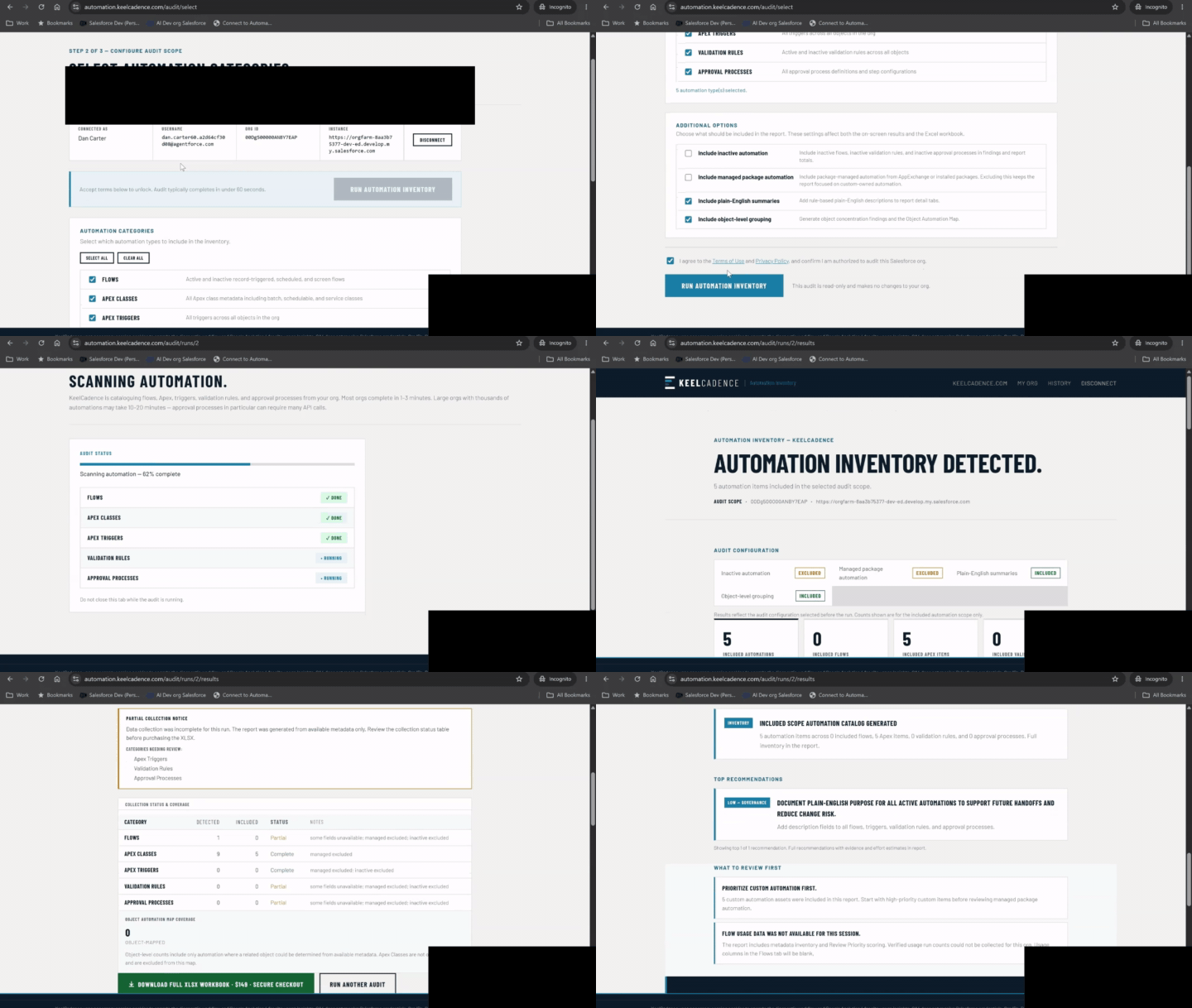
↳Condensed Automation Inventory workflow shown with demo/sample data.
WHAT THIS INVENTORY IS FOR.
Salesforce automation can spread across Flows, Apex, triggers, validation rules, approval processes, and legacy patterns. Admins often inherit orgs where nobody has a clean view of what exists or where to review first.
Automation Inventory gives admins a structured workbook for cataloging available automation metadata before changes, cleanup, modernization, or handoff work begins.
What automation exists in this org?
What Gets Catalogued
Also summarized into review-ready tabs such as object automation mapping, legacy candidates, duplicate-name patterns, and description/documentation signals where available.
WHEN TO RUN THIS DIAGNOSTIC.
- Before touching Flows, Apex, triggers, validation rules, or approval processes.
- Right after inheriting automation you did not build.
- When you need to understand what automation exists before making changes.
- Before deprecating, consolidating, or rebuilding existing automation.
- When planning an automation review or governance effort.
THIS WORKBOOK IS USEFUL WHEN.
- You need to understand active automation before making changes.
- You are reviewing flows, triggers, validation rules, and approval processes.
- You are onboarding into an unfamiliar org.
- You are scoping technical debt work.
WHAT THE WORKBOOK INCLUDES.
The paid workbook is designed to make available automation metadata easier to review and prioritize.
Cover summary with audit scope and run details
Executive Summary with counts, priority distribution, and top review areas
Automation Findings with severity ratings and review notes
Automation Health Score
Recommendations
Duplicate Candidates
Flows grouped by type, status, and trigger context
Apex Classes
Apex Triggers
Validation Rules
Approval Processes
Object Automation Map
Review Tracker
Legend and methodology notes
WHAT THE FREE SUMMARY SHOWS.
The free on-screen summary gives a high-level view of automation counts and headline findings before purchase. It may include detected automation categories, included counts, collection status, legacy candidates, object concentration, and potential review areas.
The full XLSX workbook includes the detailed metadata rows, findings, recommendations, and review tabs.
WHAT THE REPORT HELPS YOU DECIDE.
- Which automation categories are present
- Which objects have concentrated automation
- Which Flows, triggers, validation rules, and approval processes should be reviewed
- Which items may be legacy or modernization review candidates
- Which items may be name-similarity duplicate candidates
- Which areas need documentation or owner review
WHAT THIS REPORT DOES NOT CLAIM.
- It does not claim complete dependency analysis.
- It does not prove two automations are functionally identical.
- It does not guarantee that automation is safe to delete.
- It does not simulate business logic execution.
- It does not modify, activate, deactivate, or delete automation.
- It catalogs available metadata and flags review candidates.
- The report catalogs available automation metadata. It does not export Salesforce business record content.
- This version does not collect Scheduled Apex, Platform Events, or Workflow Rule actions. Absence from the workbook means those categories were not collected, not that they were reviewed and found clean.
Automation findings are review candidates. Validate logic, ownership, business purpose, and downstream impact before changing or removing automation.
TRUST MODEL.
- ✓No package install
- ✓No Connected App setup
- ✓Read-only diagnostics
- ✓No Salesforce writes
- ✓No automation changes
- ✓No Apex source execution
- ✓Free on-screen summary before purchase
- ✓Paid downloadable XLSX workbook
- ✓90-day report retention
- ✓Email-first product support
Why a bookmarklet instead of OAuth?
KeelCadence uses a browser-session-based connection so admins can run a diagnostic without installing a package, creating a Connected App, granting a long-lived OAuth refresh token, or giving KeelCadence persistent Salesforce access. The session is used only to read the metadata and aggregate signals needed for the diagnostic workbook. It does not create, update, or delete Salesforce records.
Common questions.
IS THIS A SALESFORCE DEPENDENCY SCANNER?+
No. Automation Inventory catalogs available automation metadata and surfaces review candidates. It does not claim complete dependency analysis or exact execution simulation.
DOES IT CHANGE AUTOMATION?+
No. The audit is read-only. It does not activate, deactivate, deploy, delete, or modify Flows, Apex, triggers, validation rules, or approval processes.
WHAT DOES "POTENTIAL DUPLICATE CANDIDATE" MEAN?+
It means the workbook identified items that may deserve review based on available metadata, naming patterns, or similarity indicators. It does not prove the automations are functionally identical.
CAN I SEE THE WORKBOOK BEFORE BUYING?+
Yes. A sample workbook is available before you connect your org or purchase.
CATALOG AUTOMATION BEFORE YOU CHANGE IT.
Run a read-only Automation Inventory to understand available Salesforce automation metadata before cleanup, handoff, or modernization work.
EXPLORE OTHER
REVIEW WORKBOOKS.
Field & Object Audit
Review field usage, object health, layout coverage, hidden data, and cleanup candidates in one workbook.
$99 · Learn more →
Permission & FLS Audit
Map profiles, permission sets, object permissions, FLS exposure, and over-privileged access into a review-ready workbook.
$249 · Learn more →
Automation Impact Awareness
Review selected-object readiness factors before imports, UAT, test-data setup, or bulk updates.
$149 · Learn more →
Dependency Map
See detected references across Apex, Flows, and Validation Rules before you change, retire, or clean up a field.
$149 · Learn more →
KeelCadence uses session cookies and Google Analytics 4 for site usage insights. GA4 does not receive Salesforce credentials, Org IDs, Report IDs, or payment data. You can opt out for this browser.