SALESFORCE PERMISSION & FLS AUDIT WORKBOOK.
Before you change a profile, permission set, or field-level security setting, understand who currently has access to what. Permission & FLS Audit maps profiles, permission sets, object permissions, FLS exposure, and user-level risk into a single review-ready workbook.
Read-only · No package install · No Connected App · Paid XLSX workbook
Opens permissions.keelcadence.com. Best run from desktop, since the diagnostic uses your active Salesforce browser session.
- Price
- $249 one-time
- Before you buy
- Free on-screen summary
- Workbook
- 19 review-ready sheets
- Delivery
- XLSX workbook download
- ✓Read-only Salesforce access
- ✓No package install required
- ✓No Connected App setup
- ✓Session-based auth — nothing stored
SEE THE WORKBOOK
BEFORE YOU CONNECT AN ORG.
Sample workbook shown. Free on-screen summary available before purchase.
The paid XLSX includes structured findings, evidence, recommendations, and review-ready tabs.
Free summary first · Read-only · No package install
| Profile / Perm Set | Object | View All | Modify All | Risk |
|---|---|---|---|---|
| Legacy Sales ProfileAnnotated row: Flagged: View All + Modify All on Account granted to a profile assigned to 41 users. | Account | Yes | Yes | High |
| Marketing User | Opportunity | Yes | No | Medium |
| Integration PS_v1 | Contact | Yes | Yes | High |
| Support Tier 1 | Case | No | No | Low |
| Ops Admin Clone | Account | Yes | Yes | High |
| RevOps PS | Opportunity | Yes | No | Medium |
| Legacy API Profile | Lead | Yes | Yes | High |
Flagged: View All + Modify All on Account granted to a profile assigned to 41 users.
SEE THE PERMISSION & FLS AUDIT WORKFLOW.
Connect from Salesforce, run the read-only access diagnostic, and review permission and field-level security findings before deciding whether to download the full XLSX workbook.
Prefer the full walkthrough? Watch the tutorial showing setup, Salesforce connection, diagnostic configuration, run, and results.
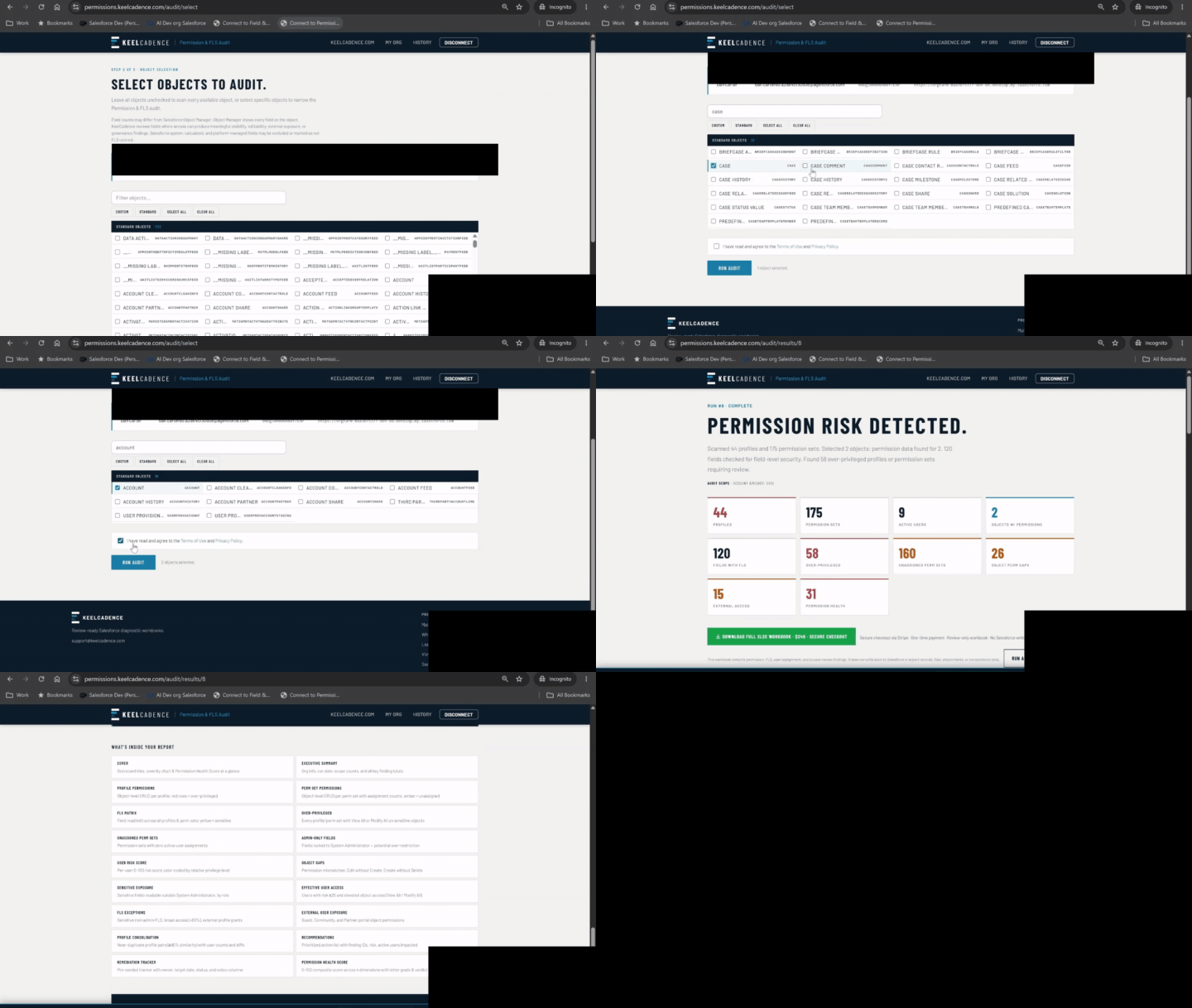
↳Condensed Permission & FLS Audit workflow shown with demo/sample data.
WHAT THIS AUDIT IS FOR.
Salesforce access grows over time. Profiles, permission sets, permission set groups, field-level security, and object permissions can stack together in ways that make access difficult to explain.
The Permission & FLS Audit gives admins a structured first-pass workbook for reviewing who has access to what, where over-privilege may exist, and which access patterns deserve review first.
Who has access to what, and where should we review first?
What Gets Reviewed
Permission Set Group membership and source attribution are included within the permission and FLS analysis, not as a separate worksheet. Also summarized into review-ready tabs such as over-privileged access, FLS exposure, unassigned permission sets, duplicate access patterns, user-level review signals, and remediation tracking.
WHEN TO RUN THIS DIAGNOSTIC.
- Before an access review ahead of cleanup, redesign, or admin handoff.
- Before changing profiles, permission sets, object access, or field-level security.
- When preparing for a security or compliance review.
- Right after inheriting an org with unknown access patterns.
- When you suspect over-privileged users or unused permission sets.
THIS WORKBOOK IS USEFUL WHEN.
- You need to review profile and permission set exposure.
- You are preparing for access cleanup.
- You need a workbook before discussing access risk with a client or stakeholder.
- You are assessing a client org without installing an AppExchange package.
WHAT THE WORKBOOK INCLUDES.
The paid workbook is designed to be an access-review artifact, not a raw permission export.
Cover summary with audit scope and run details
Executive Summary with severity dashboard and where-to-start guidance
Over-Privileged access findings
Sensitive Exposure — fields readable by non-admin profiles or permission sets
FLS Exceptions — sensitive fields with broader-than-expected access
External User Exposure indicators, where available
Unassigned Permission Sets
Profile Consolidation candidates
User Risk Score
Permission Health Score
Recommendations with priority
Remediation Tracker
Profile Permissions and Permission Set Permissions detail tabs, with Permission Set Group membership and source attribution included in the analysis
FLS Matrix
Legend and methodology notes
WHAT THE FREE SUMMARY SHOWS.
The free on-screen summary gives a high-level view of access findings before purchase. It may include counts for profiles, permission sets, assignments, over-privileged access, sensitive exposure, external access indicators, and headline review items.
The full XLSX workbook includes the detailed rows, matrices, recommendations, and remediation tracker.
WHAT THE REPORT HELPS YOU DECIDE.
- Which profiles or permission sets deserve review first
- Where object-level permissions may be broader than needed
- Where field-level security exposes sensitive fields
- Which users may have elevated access through stacked permissions
- Which permission sets are assigned, unassigned, duplicated, or potentially redundant
- Which findings should move into a remediation plan
WHAT THIS REPORT DOES NOT CLAIM.
- It is not a replacement for a full security assessment.
- It does not evaluate Record Type visibility, Apex Class or Apex Page access, Tab visibility or access, Custom Permissions, or Sharing Rules and Organization-Wide Defaults (OWD).
- It does not automatically decide whether access is appropriate.
- It does not modify profiles, permission sets, assignments, or FLS.
- It does not remove users or change permissions.
- It does not guarantee that every business risk is visible from metadata alone.
- The report maps access configuration, profiles, permission sets, object permissions, and field-level security. It does not export the underlying field values users may have access to.
Permission findings require business context. Use the workbook to identify review areas, then validate intended access with system owners, data owners, and business stakeholders.
TRUST MODEL.
- ✓No package install
- ✓No Connected App setup
- ✓Read-only diagnostics
- ✓No Salesforce writes
- ✓No permission changes
- ✓No individual Salesforce record values exported
- ✓Free on-screen summary before purchase
- ✓Paid downloadable XLSX workbook
- ✓90-day report retention
- ✓Email-first product support
Why a bookmarklet instead of OAuth?
KeelCadence uses a browser-session-based connection so admins can run a diagnostic without installing a package, creating a Connected App, granting a long-lived OAuth refresh token, or giving KeelCadence persistent Salesforce access. The session is used only to read the metadata and aggregate signals needed for the diagnostic workbook. It does not create, update, or delete Salesforce records.
Common questions.
IS THIS A FULL SALESFORCE SECURITY AUDIT?+
No. It is a focused Permission & FLS diagnostic. It helps surface access-review candidates, over-privileged patterns, and field-level security exposure, but it does not replace a complete security assessment.
DOES IT CHANGE PERMISSIONS?+
No. The audit is read-only. It does not create, update, delete, assign, remove, or modify profiles, permission sets, users, or field-level security.
WHY IS THIS THE MOST COMPREHENSIVE KEELCADENCE REPORT?+
Access risk is one of the highest-value Salesforce admin problems. The most comprehensive access review workbook, covering profile, permission-set, object-permission, FLS, and user-assignment analysis. Permission and FLS issues can affect data exposure, least-privilege review, external access, and governance.
DOES IT COVER PERMISSION SET GROUPS?+
Yes. Permission Set Group membership and source attribution are included within the permission and FLS analysis — reflected in the profile/permission-set matrices and effective-access findings — rather than broken out as their own worksheet.
CAN I SEE THE WORKBOOK BEFORE BUYING?+
Yes. A sample workbook is available before you connect your org or purchase.
START WITH ACCESS VISIBILITY.
Run a read-only Permission & FLS Audit to review profiles, permission sets, object access, FLS exposure, and user-level risk in one workbook.
EXPLORE OTHER
REVIEW WORKBOOKS.
Field & Object Audit
Review field usage, object health, layout coverage, hidden data, and cleanup candidates in one workbook.
$99 · Learn more →
Automation Inventory
Catalog available Salesforce automation metadata across Flows, Apex, triggers, validation rules, and approval processes.
$149 · Learn more →
Automation Impact Awareness
Review selected-object readiness factors before imports, UAT, test-data setup, or bulk updates.
$149 · Learn more →
Dependency Map
See detected references across Apex, Flows, and Validation Rules before you change, retire, or clean up a field.
$149 · Learn more →
KeelCadence uses session cookies and Google Analytics 4 for site usage insights. GA4 does not receive Salesforce credentials, Org IDs, Report IDs, or payment data. You can opt out for this browser.