SALESFORCE FIELD & OBJECT AUDIT WORKBOOK.
Before you hide, delete, or archive a field, know which ones are actually used. Field & Object Audit gives you a review-ready workbook of field usage, fill rates, layout coverage, and cleanup candidates so you can act with evidence.
Read-only · No package install · No Connected App · Paid XLSX workbook
Opens audit.keelcadence.com. Best run from desktop, since the diagnostic uses your active Salesforce browser session.
- Price
- $99 one-time
- Before you buy
- Free on-screen summary
- Workbook
- 14 review-ready sheets
- Delivery
- XLSX workbook download
- ✓Read-only Salesforce access
- ✓No package install required
- ✓No Connected App setup
- ✓Session-based auth — nothing stored
Cleanup Review — 15% off Field & Object Audit and Dependency Map.
Use them together when your cleanup review calls for both. Each diagnostic runs independently and produces its own XLSX workbook. Run Field & Object Audit to surface cleanup review candidates, then use Dependency Map to review detected references within evaluated coverage before you make a change.
Enter code CLEANUP15 at checkout on either or both tools. Each purchase is billed and delivered separately.
SEE THE WORKBOOK
BEFORE YOU CONNECT AN ORG.
Sample workbook shown. Free on-screen summary available before purchase.
The paid XLSX includes structured findings, evidence, recommendations, and review-ready tabs.
Free summary first · Read-only · No package install
| Object | Field API Name | Populated % | Layouts | Status |
|---|---|---|---|---|
| AccountAnnotated row: Flagged: populated in 0.4% of records and not present on any active layout. | Legacy_Score__c | 0.4% | 0 | Flagged |
| Account | Region__c | 92.7% | 3 | Active |
| Contact | Import_Batch_ID__c | 3.1% | 0 | Flagged |
| Opportunity | Renewal_Stage__c | 88.2% | 2 | Active |
| Lead | Old_Owner_Email__c | 11.6% | 1 | Flagged |
| Opportunity | Contract_Term__c | 64.9% | 2 | Active |
| Account | Sync_Status_v1__c | 1.8% | 0 | Flagged |
Flagged: populated in 0.4% of records and not present on any active layout.
SEE THE FIELD & OBJECT AUDIT WORKFLOW.
Select the objects you want to review, run a read-only diagnostic, and review your free on-screen summary before deciding whether to download the full XLSX workbook.
Prefer the full walkthrough? Watch the tutorial showing setup, Salesforce connection, diagnostic configuration, run, and results.
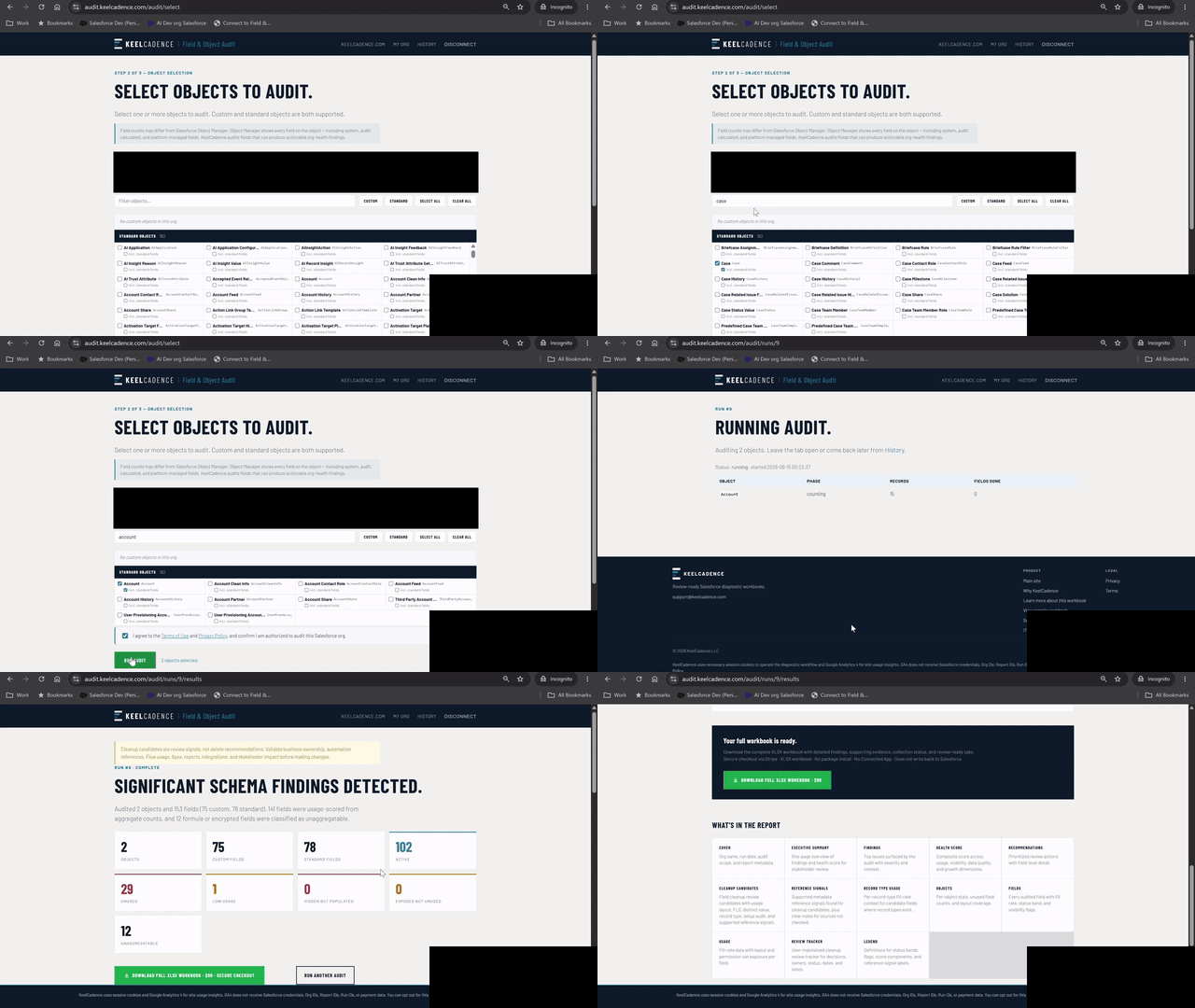
↳Condensed Field & Object Audit workflow shown with demo/sample data.
WHAT THIS AUDIT IS FOR.
Salesforce orgs accumulate fields over time. Some fields are active, some are empty, some are hidden from users, and some still carry data even though they no longer appear on key layouts.
The Field & Object Audit gives admins a structured first-pass workbook for understanding object and field health before cleanup, redesign, migration, or governance work begins.
Which fields and objects should we review first?
What Gets Reviewed
Also summarized into review-ready tabs such as cleanup candidates, health scoring, recommendations, record type usage, field detail, and review tracking.
WHEN TO RUN THIS DIAGNOSTIC.
- Before you hide, delete, merge, or archive fields in a cleanup project.
- Right after inheriting an org with an unfamiliar or overgrown schema.
- When you do not know which fields are actually populated before changing them.
- When teams no longer trust pipeline, account, case, or operational data.
- Before a data-quality, migration, or layout redesign initiative.
THIS WORKBOOK IS USEFUL WHEN.
- You inherited an org with unclear field usage.
- You are planning field cleanup.
- You need object-level visibility before changing layouts, automations, or reporting.
- You are a consultant scoping a cleanup or org assessment.
WHAT THE WORKBOOK INCLUDES.
The paid workbook is designed to be a review artifact, not a raw export.
Cover summary with audit scope and run details
Executive Summary for stakeholder review
Headline Findings with severity and context
Schema Health Score
Recommendations
Object-level statistics
Field-level usage details
Fill-rate and status-band analysis
Layout and visibility context
Hidden populated field review
Exposed but unused field review, where available
Record type usage breakdown
Change log or cleanup tracker
Legend and methodology notes
WHAT THE FREE SUMMARY SHOWS.
The free on-screen summary gives a quick view of the audit results before purchase. It may include audited object count, field count, active fields, unused fields, low-usage fields, unaggregatable fields, and headline cleanup signals.
The full XLSX workbook includes the detailed rows, recommendations, scoring context, and review tabs.
WHAT THE REPORT HELPS YOU DECIDE.
- Which objects have the most field debt
- Which fields appear unused or low-usage
- Which hidden fields still contain data
- Which fields should be reviewed before cleanup
- Which objects need business-owner validation
- Where field visibility, layout coverage, or usage patterns deserve follow-up
WHAT THIS REPORT DOES NOT CLAIM.
- It does not automatically delete fields.
- It does not guarantee a field is safe to remove.
- It does not replace business-owner validation.
- It does not claim to detect every downstream dependency.
- It does not modify Salesforce data or metadata.
- Field usage is calculated from aggregate counts. Individual field values and record-level data are not exported.
Findings are review candidates. Validate cleanup decisions with business owners, reporting owners, automation owners, and downstream system owners before removing fields.
TRUST MODEL.
- ✓No package install
- ✓No Connected App setup
- ✓Read-only diagnostics
- ✓No Salesforce writes
- ✓No individual record values exported
- ✓Aggregate field usage checks only where needed
- ✓Free on-screen summary before purchase
- ✓Paid downloadable XLSX workbook
- ✓90-day report retention
- ✓Email-first product support
Why a bookmarklet instead of OAuth?
KeelCadence uses a browser-session-based connection so admins can run a diagnostic without installing a package, creating a Connected App, granting a long-lived OAuth refresh token, or giving KeelCadence persistent Salesforce access. The session is used only to read the metadata and aggregate signals needed for the diagnostic workbook. It does not create, update, or delete Salesforce records.
Common questions.
IS THIS A SALESFORCE FIELD CLEANUP TOOL?+
It is a diagnostic workbook for field and object cleanup planning. It identifies review candidates and supporting evidence, but cleanup decisions should still be validated with business owners and system owners.
DOES THE AUDIT DELETE OR CHANGE FIELDS?+
No. The audit is read-only. It does not create, update, delete, hide, or modify Salesforce fields, objects, records, layouts, or metadata.
WHY WOULD I PAY FOR THIS INSTEAD OF EXPORTING METADATA MYSELF?+
The value is the structured review workbook: findings, field status bands, object-level context, recommendations, scoring, and cleanup tracking in a format that can be reviewed and shared.
CAN I SEE THE WORKBOOK BEFORE BUYING?+
Yes. A sample workbook is available before you connect your org or purchase.
START WITH FIELD VISIBILITY.
Run a read-only Field & Object Audit to understand field usage, object health, and cleanup candidates before starting manual cleanup work.
EXPLORE OTHER
REVIEW WORKBOOKS.
Permission & FLS Audit
Map profiles, permission sets, object permissions, FLS exposure, and over-privileged access into a review-ready workbook.
$249 · Learn more →
Automation Inventory
Catalog available Salesforce automation metadata across Flows, Apex, triggers, validation rules, and approval processes.
$149 · Learn more →
Automation Impact Awareness
Review selected-object readiness factors before imports, UAT, test-data setup, or bulk updates.
$149 · Learn more →
Dependency Map
See detected references across Apex, Flows, and Validation Rules before you change, retire, or clean up a field.
$149 · Learn more →
KeelCadence uses session cookies and Google Analytics 4 for site usage insights. GA4 does not receive Salesforce credentials, Org IDs, Report IDs, or payment data. You can opt out for this browser.