UNDERSTAND A MESSY
SALESFORCE ORG
BEFORE YOU CLEAN IT UP,
SCOPE IT, OR CHANGE IT.
KeelCadence gives independent consultants, fractional admins, and small Salesforce teams practical diagnostic workbooks for fields, permissions, automation, and change risk without installing a package or setting up another platform.
Planning to run a diagnostic? Desktop is recommended before connecting Salesforce.
Four Diagnostic Workbooks
Field & Object Audit$99Automation Inventory$149Permission & FLS Audit$249Automation Impact Awareness$149- ✓Read-only access
- ✓No package install
- ✓No persistent token storage
- ✓XLSX workbook delivered
START WHERE YOUR
ORG IS RIGHT NOW.
Field bloat, permission sprawl, undocumented automation, and risky changes all start with the same first step: visibility. Find the moment you are in, then start with the matching workbook.
Not sure where to start? Most teams begin with Field & Object Audit for quick org visibility. Review the sample workbook first, then run a free on-screen summary before purchasing.
Inherited Org Review
For admins or consultants taking over a Salesforce org with unclear fields, permissions, automation, documentation, or cleanup history.
Consultant Discovery
For independent consultants and fractional admins who need a clean first-pass diagnostic before scoping cleanup, access review, automation review, or migration readiness.
Pre-Change Review
For small teams preparing field cleanup, permission changes, imports, bulk updates, record type changes, automation cleanup, or process changes.
You inherited a Salesforce org
Start with Field & Object, Permission & FLS, or Automation Inventory before making changes.
Start with inherited org review →You are cleaning up fields
Run Field & Object Audit before hiding, deleting, merging, or archiving fields.
Run Field & Object Audit →You need an access review
Run Permission & FLS Audit before changing profiles, permission sets, object access, or FLS.
Run Permission & FLS Audit →You are preparing an import or UAT
Run Impact Awareness before loading records, creating test data, or validating object readiness.
Check object readiness →You are changing automation
Run Automation Inventory before touching Flows, Apex, triggers, validation rules, or approvals.
Inventory automation →You are a consultant starting discovery
Use a diagnostic workbook as a first-pass client artifact before recommending remediation.
View consultant discovery resources →SEE THE WORKBOOK
BEFORE YOU CONNECT AN ORG.
Sample workbook shown. Free on-screen summary available before purchase.
The paid XLSX includes structured findings, evidence, recommendations, and review-ready tabs.
KeelCadence produces review-ready diagnostic workbooks, not another Salesforce dashboard to maintain. Why KeelCadence →
Example Field & Object output: 119 of 235 fields were surfaced as cleanup review candidates, giving the team a concrete list to validate before making changes.
Results vary by org. The downloadable sample workbook uses fictitious, anonymized demo data.
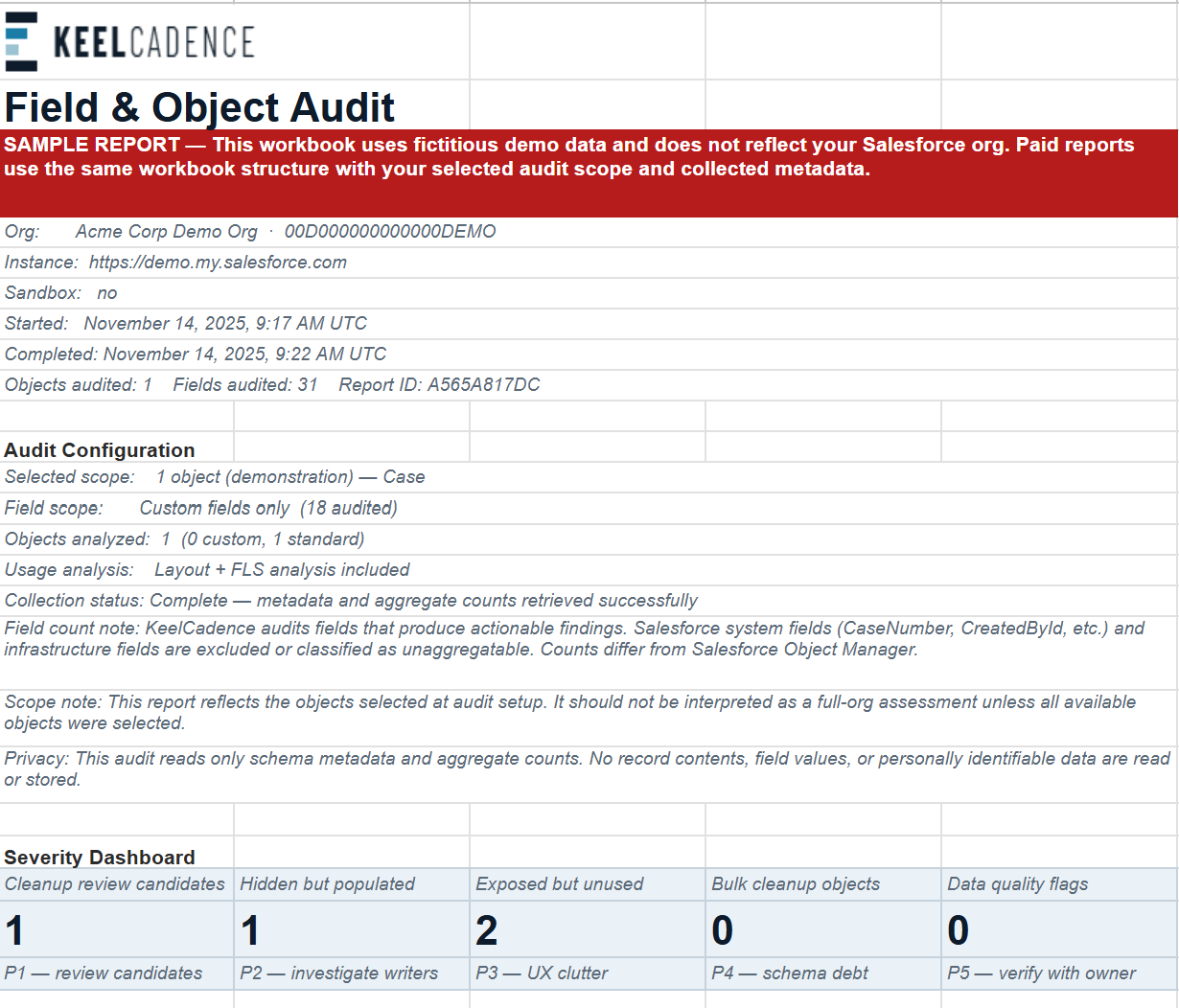
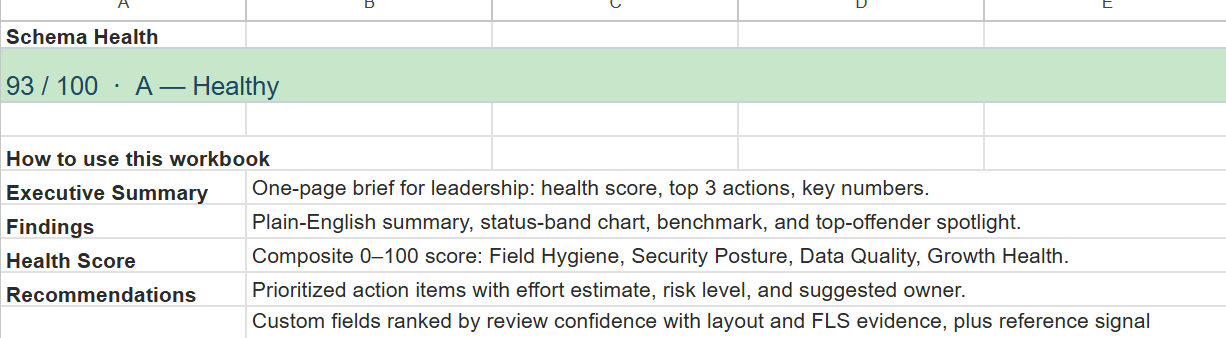
Preview images show a sample workbook, not a real Salesforce org. Fictitious, anonymized demo data.
THE TOOL
SUITE.
Self-serve Salesforce diagnostics built for admins who need answers fast. Connect with a short-lived browser session, run a read-only audit, and get immediate findings. Built for focused review projects, cleanup planning, access review, automation review, imports, UAT, and admin handoff.
Choose the diagnostic based on what you are about to do next.
Cleanup, access review, automation review, imports, UAT, and admin handoff each create a different kind of Salesforce risk. KeelCadence turns those moments into focused diagnostic workbooks.
Field & Object Audit
Identify field bloat, hidden populated fields, low-usage fields, layout gaps, and object-level cleanup opportunities.
Use when: Before inherited-org review, field cleanup, object review, reporting cleanup, or consultant discovery.
Read-only · No Salesforce writes · No package install · No Connected App
Permission & FLS Audit
Map profile, permission set, object permission, and field-level security exposure in one read-only audit report. Surfaces over-privileged access, unassigned permission sets, duplicate access patterns, and user-level risk.
Use when: Before access review, profile and permission set cleanup, over-permissioned user review, or client security discovery.
Read-only · No Salesforce writes · No package install · No Connected App
Automation Inventory
Catalog available Salesforce automation metadata across Flows, Apex classes, triggers, validation rules, and approval processes into a review-ready XLSX workbook. Built for admins inheriting unknown or overgrown Salesforce orgs who need to understand what automation exists before making changes.
Use when: Before flow cleanup, org handoff, technical debt review, or automation discovery.
Read-only · No Salesforce writes · No package install · No Connected App
Automation Impact Awareness
Analyze selected objects to see what may affect record creation, imports, updates, UAT, or test-data setup. Surfaces required fields, required lookups, record types, restricted picklists, validation rules, Apex triggers, and flow metadata where available.
Use when: Before imports, bulk updates, field changes, record type changes, process changes, or UAT where automation and validation rules may block work.
Read-only · No Salesforce writes · No package install · No Connected App
BUILT FOR LEAN SALESFORCE OPERATORS.
When you are the only admin, the fractional owner, or the consultant walking into a messy org, every change carries risk and there is no second pair of eyes to catch it. KeelCadence gives you a workbook-first view of fields, permissions, automation, and change blockers before you start cleanup, scope the work, or make changes.
You do not need an internal review team or an enterprise governance platform to work safely. Run a focused diagnostic, read the findings, and decide what to change with evidence in hand.
KeelCadence was founded by a Salesforce practitioner with more than 10 years of experience across implementations, administration, permissions, automation, and operational review. Those are the same areas where these problems show up again and again.
LOW-FRICTION,
READ-ONLY
DIAGNOSTICS.
KeelCadence tools are diagnostic-only. They run read-only metadata and aggregate configuration checks, then generate on-screen findings and an optional downloadable workbook. Get a clean diagnostic without install approvals, setup work, or the risk of writing to an org you are still learning.
- No managed package install
- No Connected App setup
- No Salesforce writes
- No persistent Salesforce access token stored
- Read-only metadata and aggregate configuration signals only
- No customer records, files, attachments, or transactional data exported
- Session-based access expires when your Salesforce session ends
- Audit reports retained for 90 days and deletable on request
- Workbook output you can review, share, and use for scoping
Works with Professional, Enterprise, Unlimited, and Developer editions. System Administrator profile recommended for full results.
Connect
Open your Salesforce org in the browser. No install.
Run free summary
Read-only queries run inside your active session and findings appear on-screen.
Review findings
Review counts, risks, and recommendations before you buy.
Export workbook
Download the full XLSX for sharing or remediation: $99 Field & Object Audit, $149 Automation Inventory or Automation Impact Awareness, $249 Permission & FLS Audit.
SIMPLE,
TRANSPARENT
ACCESS.
A faster starting point than manual Salesforce discovery.
Run a focused diagnostic, download the workbook, and start remediation with a prioritized findings list.
BEFORE YOU BUY,
YOU CAN REVIEW
THE MODEL.
KeelCadence is designed to be evaluated before purchase. Each diagnostic provides a free on-screen summary, sample workbooks are available before connecting an org, and the security model explains what the tools access, export, and store.
- Free on-screen summary before purchase
- Sample workbook available for each diagnostic
- Read-only, session-based diagnostics
- No package install or Connected App setup
- No customer records, files, attachments, emails, Chatter content, or transactional data exported
- Security and IT Review pages available
You can run a free on-screen summary before purchasing the full workbook. Checkout is handled securely by Stripe only after you choose to download the paid XLSX report. The report is review-only and does not write back to Salesforce.
If a paid workbook fails to generate because of a KeelCadence issue, contact support with your Report ID and error details so the issue can be reviewed.
Field & Object Audit
Best starting point for inherited org review, field cleanup, and first-pass schema visibility.
Before you start field cleanup, run a schema diagnostic. Get a downloadable XLSX workbook covering field usage, fill rates, hidden populated fields, layout coverage, cleanup candidates, and prioritized recommendations.
XLSX workbook: field usage, fill rates, hidden populated fields, exposed-but-unused fields, layout coverage, cleanup candidates, and a 0–100 schema health score.
Permission & FLS Audit
Before you manually review profiles, permission sets, object permissions, and FLS, run a focused access-risk diagnostic. Get a downloadable workbook covering over-privileged access, FLS exposure, unassigned permission sets, duplicate access patterns, and user-level risk.
XLSX workbook: profiles, permission sets, object permissions, FLS exposure, user assignment patterns, over-privileged access, and a remediation tracker.
The most comprehensive access review workbook — priced for the breadth of profile, permission-set, and field-level analysis it covers.
Automation Inventory
Before you touch automation in an unfamiliar org, catalog available automation metadata across Flows, Apex classes, triggers, validation rules, and approval processes in a review-ready XLSX workbook.
XLSX workbook: available automation metadata across Flows, Apex classes, Apex triggers, validation rules, and approval processes.
Automation Impact Awareness
Before you import records, run UAT, or set up test data, analyze selected objects for required fields, required lookups, record types, restricted picklists, validation rules, Apex triggers, and flow metadata where available.
XLSX workbook: per-object readiness signals — required fields, restricted picklists, record types, validation rules, Apex triggers, and flow metadata where available.
Free Summary
On-screen summary with final counts and key risk findings. No account required.
Email Support
Questions about your report? Email KeelCadence with your Report ID for product support.
Current prices are shown on each diagnostic page before checkout. Prices may change as KeelCadence expands report coverage.
Do I need to install a package?
No. KeelCadence audits do not require a managed package install or Connected App setup.
Does purchasing a workbook change anything in Salesforce?
No. The workbook is review-only. KeelCadence diagnostics do not write records, modify metadata, install a package, or create a Connected App.
What happens before I pay?
You can run a free on-screen results summary before purchasing the full XLSX workbook. Payment is only required if you choose to download the paid report.
What format is the report?
All paid reports are delivered as a downloadable XLSX workbook with multiple tabs covering findings, recommendations, and detailed data. A free on-screen summary is always included before purchase.
How is this different from free AppExchange tools?
Most free AppExchange tools require a managed package install and still leave you to interpret raw output. KeelCadence runs with no package install and returns a structured, review-ready workbook with findings, evidence, and recommendations you can share or bill to a project.
Which workbook should I start with?
Most teams start with Field & Object Audit for quick org visibility. If your priority is access risk, start with Permission & FLS Audit. For automation review start with Automation Inventory, and before an import or UAT start with Automation Impact Awareness.
Can consultants use this for client discovery?
Yes. Independent consultants and fractional admins use KeelCadence workbooks as a clean first-pass diagnostic when scoping cleanup, access review, automation review, or migration readiness for a client org. Use it as part of discovery and bill it to the project.
How long are reports retained?
Audit reports are retained for 90 days and can be deleted on request.
WHAT THE
WORKBOOK
SHOWS.
These illustrate the kind of output each workbook produces, built around recurring Salesforce problems: field bloat, hidden data, permission sprawl, undocumented automation, and pre-change risk. They include automation patterns such as Flow sprawl, legacy automation candidates, trigger concentration, name-similarity review candidates, and undocumented configuration areas.
The figures below are example diagnostic outputs, not customer results or guarantees. Actual results vary by org.
Field Bloat & Hidden Data Review
The org had hundreds of fields with no clear view of which were active, unused, hidden from users, or still carrying data. Admins could not confidently clean up the data model without risking downstream impact.
Audited object structure, field definitions, page layout coverage, FLS visibility, and field fill rates. Findings were grouped into active fields, low-usage fields, unused fields, hidden populated fields, and cleanup candidates.
Field review moved from guesswork to a prioritized workbook. A single-object diagnostic reviewed 235 fields and surfaced 119 cleanup review candidates, with additional validation notes around low-fill required fields and data quality.
Relevant ToolThis is what the Field & Object Audit delivers: object coverage, fill rates, and FLS gaps in a single workbook.
Field & Object Audit →Permission Sprawl & FLS Risk Review
Profiles and permission sets had accumulated over time, creating unclear access paths and making it difficult to identify over-privileged users, sensitive field exposure, and abandoned permission sets.
Mapped object permissions, field-level security, permission set assignments, admin-only fields, over-privileged access, and permission stacking into a single reviewable report.
Permission review became visible, explainable, and ready for cleanup. An org audit returned a Permission Health Score of 18/100, 67 over-privileged profiles and permission sets, and 7 sensitive fields with FLS exposure across active users.
Relevant ToolThe Permission & FLS Audit produces this output: profile and permission set coverage across every object and field.
Permission & FLS Audit →Automation Sprawl & Flow Governance Review
Business processes depended on Flows and automations that were hard to trace, inconsistently documented, and difficult for admins to safely change.
Reviewed active automations by object, trigger point, business purpose, and downstream action. Identified overlapping logic, brittle handoffs, and areas where documentation was missing.
Automation complexity was translated into a practical admin review path. A single run catalogued 259 automations across 5 categories, flagged 85 legacy candidates (33% of total), and identified 22 potential duplicate or name-similarity review candidates.
Relevant ToolAutomation Inventory does this automatically: available Salesforce automation metadata across Flows, Apex classes, triggers, validation rules, and approval processes — catalogued and summarized into a review-ready XLSX report.
Automation Inventory →Pre-Import Object Diagnostic
Before a planned data migration into several objects, there was no fast way to inventory required fields, restricted picklists, active validation rules, and flows that would fire on insert without manual Setup research.
Ran Automation Impact Awareness across three objects. The diagnostic returned 18 active flows on Case, 61 restricted picklists, 14 record types, and 4 active validation rules across the scoped objects in a single session.
Required lookups, picklist constraints, and automation metadata to review before import were identified and documented before the first record was loaded.
Relevant ToolAutomation Impact Awareness produces this output for any object selection: required fields, lookup dependencies, picklist constraints, record types, and active automation in a pre-import checklist format.
Automation Impact Awareness →SEE WHAT A DIAGNOSTIC WORKBOOK LOOKS LIKE.
Start with a sample workbook, then run a free on-screen summary when you are ready to check your own Salesforce org. The paid XLSX workbook is only needed if the summary looks useful.
QUESTIONS ABOUT A REPORT?
KeelCadence is a self-serve diagnostic tool first. For report questions, finding clarification, remediation direction, or product feedback, send a note with your Report ID if you have one.
Email support@keelcadence.com →KeelCadence uses session cookies and Google Analytics 4 for site usage insights. GA4 does not receive Salesforce credentials, Org IDs, Report IDs, or payment data. You can opt out for this browser.